Agile planning for teams and their AI agents.
Run Scrum or Kanban with your team. Create cards, update tasks and manage sprints with our ChatGPT and Codex plugins or Claude Code connector, or use Workmate inside Flying Donut.
65+ MCP tools connect your AI assistant to real project work. Start with the free plan for teams up to 5.

Plan and manage work with your AI agent
Create cards, break stories into tasks and review progress with the AI tool you already use, or with Workmate inside Flying Donut.
Connect your AI tool
Install Flying Donut's published plugin in ChatGPT or Codex, or use the connector in Claude Code. Your assistant gets 65+ MCP tools to read and update cards, tasks, sprints and backlog items, with access governed by your project permissions.
“Turn this feature brief into backlog cards, then break the first card into tasks.”Choose your AI tool
Use Workmate inside Flying Donut
Open the built-in AI agent from your card or sprint. Ask it to create, assign and move work, or report on progress. Risky changes wait for your approval, and you can see the AI credits each reply uses.
“Summarize this sprint and show which cards are blocked or unassigned.”Explore Workmate
A focused agile workspace instead of another bloated work app
Flying Donut is designed for teams that need visibility, momentum, and less process overhead. It gives you the structure needed for sprint planning, backlog grooming, and task tracking, while staying flexible enough for fast-moving product, engineering, and delivery teams.
Scrum, Kanban, or both
Backlog buckets, sprint boards, and Kanban lanes, all in one project. Pick the workflow that fits your team.
Real-time for the whole team
Every change shows up instantly. No refreshing, no stale boards, no "did you see my update?" messages.
Code and planning connected
Link GitHub, Bitbucket, or GitLab commits to cards. Use the API for exports, dashboards, and automations.
And when you need help getting started, Workmate, the built-in AI agent, turns a brief into backlog cards, breaks stories into tasks, updates and organizes your work, and answers questions about your board, sprint, and backlog.
Four reasons teams switch to Flying Donut
Real-time collaboration
Keep backlog, sprint, and board activity visible as work changes. Team members see the latest status without waiting for meetings, forwarding emails, or piecing together updates from multiple tools.
Agile workflows without friction
Use backlog buckets, sprint planning, task boards, and simple prioritization flows that help teams stay organized without turning project management into a job of its own.
Dazzlingly fast: zero lag, zero waiting
Boards, backlogs, and sprints load in an instant. Every click, drag, and update feels immediate so your team spends time shipping, not staring at spinners.
Workmate for faster planning
Ask Workmate, Flying Donut's AI agent, to create cards from a short brief, break stories into tasks, estimate, assign and move work, and report on the board, sprint, and backlog. Risky changes wait for your approval.
Support the full path from planning to delivery
Backlog management
Capture ideas early, group them into meaningful buckets, refine them over time, and keep priorities visible.
Learn more →Sprint planning
Move the right work into the current sprint, break it down into tasks, and keep the team focused on what matters now.
Learn more →Kanban flow
Visualize work in progress, reduce context switching, and keep delivery moving with a board built for day-to-day execution.
Learn more →Team coordination
Assign work, follow progress, and create shared visibility for distributed, remote, or co-located teams.
Learn more →One home for your team's work and billing
Organizations own your projects and workspaces and pay for them. Start in your free personal organization, and create one for your company when the team grows.
Clear roles
Admins run everything, User admins manage people and settings without opening the work, and Billing admins handle plans and invoices.
Learn more →Join through your email domain
Verify your company domain once, and colleagues can find your organization and join, with or without approval.
Learn more →Pay for the people who work
Each organization pays for its billable members only. Followers, User admins and Billing admins are free.
Learn more →Start ready, plan around real calendars
Start new projects from the ones your team already trusts, and keep the burndown honest over public holidays and company days off.
Project templates
Turn any project into a template. New projects start with its board, backlog, labels, settings, sprints, cards and tasks.
Learn more →Holidays in the burndown
Pick your team's countries and the holidays that apply. The burndown's ideal line skips them, so the team never looks behind for days nobody worked.
Learn more →Your own days off
Add company days off once on the project. Every new sprint starts from them, and each sprint can still be adjusted on its own.
Learn more →Built for how agile teams actually work
Whether you run time-boxed sprints or a continuous delivery flow, Flying Donut has a workflow that fits.
Running Scrum
Plan sprints, manage your backlog, and track progress on a real-time board, with burndown charts and velocity built in.
Learn more →Running Kanban
Manage continuous delivery with customisable columns, flow metrics, and board-aware insights from Workmate.
Learn more →Sprint retrospectives
Ground your retro in real sprint data: burndown, velocity, and activity. Capture improvements as backlog cards and track them to completion.
Learn more →Release planning
Use labels, buckets, and sprint velocity to define release scope, forecast delivery, and keep everyone aligned on what ships and when.
Learn more →Connect the tools your team already uses
Link commits to cards, update work items from commit messages, and keep delivery progress visible without leaving your planning workflow.
GitHub
Link commits and issues to backlog work, keep delivery visible, and support teams that build in GitHub every day.
Learn about GitHub →Bitbucket
Give teams using Bitbucket a clean way to connect repository activity with backlog cards and task progress.
Learn about Bitbucket →GitLab
Support GitLab-based teams with commit visibility, workflow updates, and a planning experience built around actual delivery work.
Learn about GitLab →Slack
Post project activity to channels, get your notifications as messages, and update cards and sprints without leaving Slack.
Learn about Slack →Google Drive
Attach documents, spreadsheets, and presentations directly to cards and tasks so important files stay close to the work.
Learn about Google Drive →Dropbox
Link Dropbox files to cards and tasks so shared documents stay connected to the planning workflow.
Learn about Dropbox →API
Export project data, build custom reports, automate internal workflows, or power your own integrations.
Learn about API →ChatGPT, Codex and Claude Code
Use our published ChatGPT and Codex plugins or Claude Code connector to work with cards, tasks, sprints and backlogs through 65+ MCP tools.
Learn about ChatGPT, Codex and Claude Code →AI-powered
An AI agent that turns ideas into done work
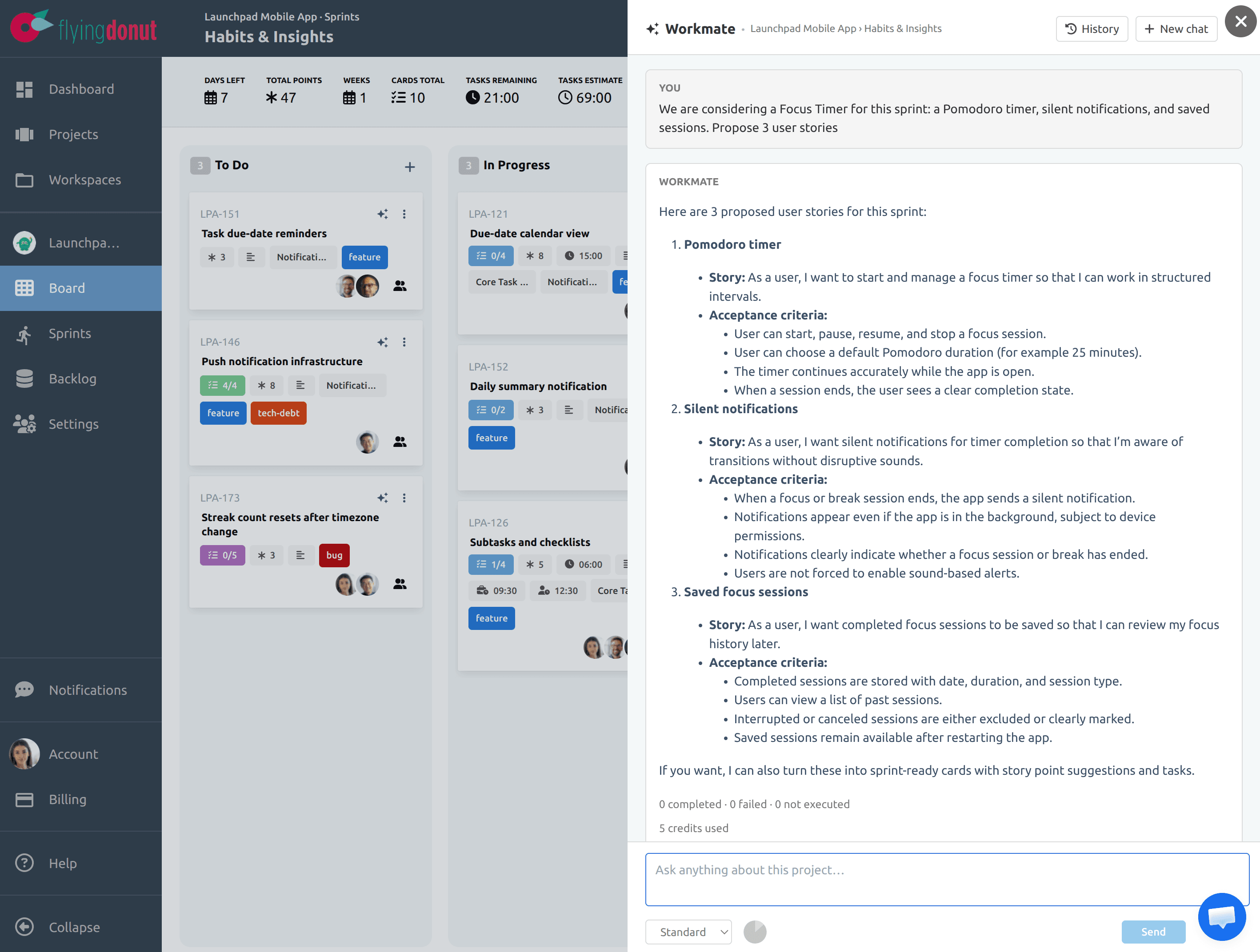
Workmate is Flying Donut's AI agent. Start with a product brief, feature request, or planning note and Workmate creates the stories, tasks, and estimates. It can also update, move, and assign work for you, and stops for your approval before anything risky.
- Create cards and tasks from a short brief
- Estimate, assign, label, and move work in plain language
- Get answers, reports, and charts about the backlog, board, or sprint
- Approve deletes and bulk changes before they run
- Keep usage predictable with visible AI credit consumption
- Add extra capacity with optional AI credit packs
Easy to start, easier to expand
Whether you are trying Flying Donut for the first time or integrating it into an existing delivery process, the documentation covers setup, integrations, API usage, and product help articles that reduce time to value.
- ✓Getting started guides for new teams
- ✓Integration setup walkthroughs
- ✓API reference and usage examples
- ✓MCP setup guides for AI coding assistants
- ✓FAQ and troubleshooting resources
Frequently asked questions
Can teams buy extra AI capacity for Workmate?+
Yes. You can purchase optional AI credit packs from the billing section whenever you need extra Workmate capacity.
Is Flying Donut only for software teams?+
No. It is especially strong for software delivery teams, but it also works well for agencies, operations teams, and cross-functional product groups that need a lightweight agile planning tool.
Can we use both Scrum and Kanban?+
Yes. Teams can use structured sprint planning, continuous flow, or a hybrid setup based on how they work.
Do academic institutions or non-profits get special pricing?+
Yes. Visit the pricing FAQ for current eligibility details and how to apply.
Can we keep our projects private?+
Yes. All paid plans support private projects. You control who has access.
Does it integrate with our development workflow?+
Yes. Flying Donut supports GitHub, Bitbucket, GitLab, and API-based extension so planning and code stay connected.
Give your team a faster way to plan and deliver
If your team wants the clarity of agile planning without the complexity of heavyweight tools, Flying Donut gives you a practical place to manage work, collaborate in real time, and stay closer to what is actually shipping.